
Personal Finance
How to Track Income and Expenses for Side Projects
Why money from side projects, rentals and content platforms gets confusing, how a simple ledger per project helps, and how content creators can keep track of income from multiple sources.
By Livy AI · · 9 min read
You rent out a spare room, run a small app on the side, take the occasional freelance job, or publish videos and earn from ads and affiliate links. Money arrives from several places, and costs leave from several places too: a tool subscription, an editor, a repair, a fee.
At the end of the month you may know each payment you received. What you often lack is a simple overview: how much came in from each activity, how much it cost, and what is left.
The problem is not necessarily earning money. It is keeping a clear picture of the income you received and the costs that came with earning it. A simple income and expense tracker for each project can give you that picture, and this guide shows how.
Why Is Money From Side Projects So Hard to Follow?
Income Arrives From Different Places
A rental payment, a platform payout, a client transfer and a commission rarely arrive in the same place or on the same day. Each source has its own dashboard and its own timing, so tracking income from multiple sources means stitching them together yourself.
Costs Get Mixed With Everyday Spending
The software you pay for your project sits next to groceries and rent in the same bank statement. Months later it is hard to say which costs belonged to which activity.
Totals Hide Where the Money Came From
One combined number tells you very little. You want to know which activity earns, which one mostly costs, and which one is worth your time.
The Idea: One Simple Ledger for Each Project
A project ledger is just a running list of money in and money out for one activity. Each entry has a label, an amount, a date and a direction. For side hustle income tracking, that is usually enough.
You can keep one in a spreadsheet, a notebook or an app. What matters is a few habits:
- One ledger per project or income source. Rental, app, freelance and each content platform get their own.
- Record income and costs in the same place. Looking only at income hides the cost of earning it.
- Log it when it happens. A payment you note today is easier than one you reconstruct next month.
- Keep labels short. "Room rent", "App store payout", "Editing" are enough.
Compared with a spreadsheet you build yourself, a lighter tool trades flexibility for speed. We looked at that trade-off in how to track daily expenses without spreadsheets.
What If Adding an Entry Was as Easy as Sending a Message?
The step that most often breaks a ledger is the entering. Livy AI lets you write a short message instead of filling in a form, and files the entry into a project for you.
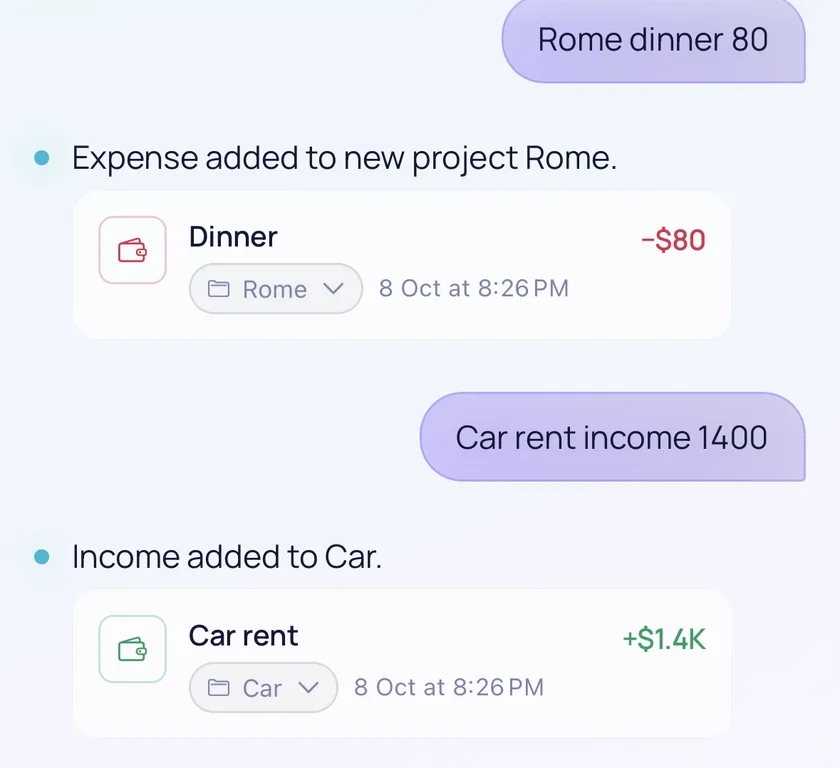
You name the project in the message. In the screenshot at the top of this page, "Car rent income 1400" was added to a Car project as income, and "Rome dinner 80" started a Rome project for an expense. That is how a rental or any other activity gets its own ledger.
You enter every amount yourself. Livy does not connect to your bank or to any platform, and it does not import payouts. It groups the entries you send into projects.
How to Track Income and Expenses by Project With Livy AI
Step 1. Add Income to a Project
Write the project name, what it was and the amount, in the web app or in the iPhone and iPad app, where you can dictate by voice. Send one entry per message:
"Car rent income 1400"
Step 2. Add the Costs of the Same Project
Costs go to the same project by using the same name. An expense and an income entry can sit in one project:
"Car service 85"
Step 3. Review the Project
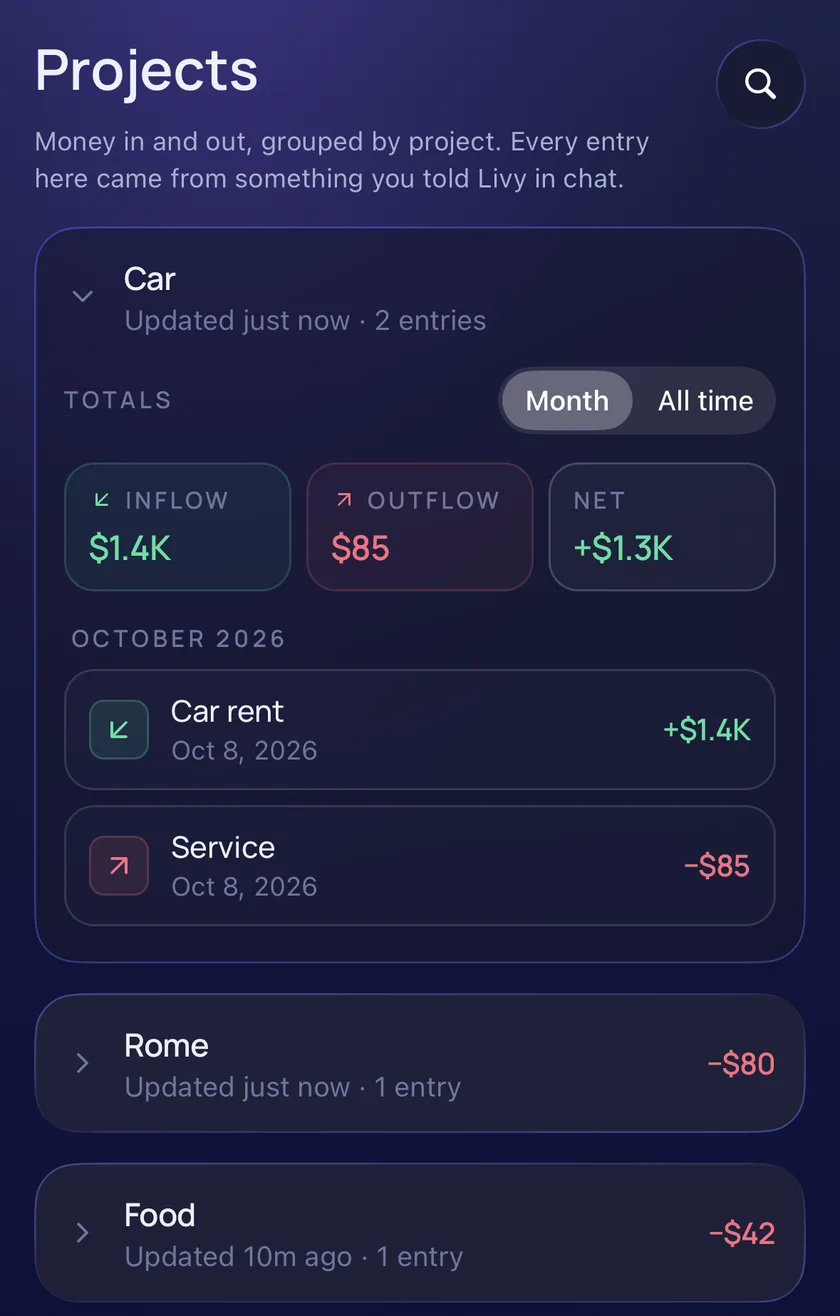
The Projects page in the dashboard shows each project with its recorded inflow, outflow and net, for the month or for all time, and the individual entries underneath. Net here simply means the difference between what you recorded coming in and going out. It is not formal accounting profit.
Step 4. Correct an Entry When Needed
Right after Livy files an entry, you can move it to another project from the chat card. For older entries, open the dashboard to edit an entry or move it. Chat does not edit older transactions.
How Content Creators Can Track Income From Multiple Platforms
Imagine a creator who publishes videos on YouTube, shares content on TikTok and Instagram, and sometimes receives affiliate commissions. At the end of the month, payments arrive from several sources. The creator may know each amount but have no simple overview of the money received across all of these activities.
The same is true for bloggers earning affiliate commissions, people who sell digital products, and anyone with several small income streams at once. A multiple income streams tracker does not need to be complicated. An income ledger for each source is a good start.
Here is an example with illustrative numbers. It is a drawn example, not a screenshot of Livy:
| Source | Income type | Amount recorded |
|---|---|---|
| YouTube ad revenue | Ad revenue | 320 |
| TikTok creator rewards | Platform rewards | 85 |
| Instagram sponsorship | Sponsorship | 250 |
| Affiliate commissions | Commissions | 145 |
| Total recorded income | 800 |
Creators have costs too, for example video editing, design software, AI tools, equipment, hosting or a website, and other content production expenses. Recording both sides helps a creator understand the money associated with the work. Income minus expenses on a page like this is a rough picture of what you recorded, not accounting profit.
Track Income by Platform
The simplest approach for creator revenue tracking is one project per platform. Each income entry is a separate message that names its platform:
- "YouTube ad income 320"
- "TikTok income 85"
- "Instagram sponsorship income 250"
Each platform then has its own project in the Projects dashboard, with its recorded inflow, outflow and net. This works like the Car project in the screenshot above. Livy files an entry by the name you give it, so use consistent names, and check the card Livy shows after each message. A project does not split into separate revenue sources by itself, so use a separate project for each source you want to see apart.
Track the Costs of Creating Content
Income is only part of the picture. Record the related costs against the same project by using the same name:
- "YouTube video editing expense 60"
- "YouTube thumbnail design 20"
Now the YouTube project holds both what it brought in and what it cost, which is the content creator income tracker view you were after, without a spreadsheet.
What About Passive and Recurring Income?
Some creators keep earning from content published earlier, and from affiliate commissions, royalties or digital products. Other money, such as sponsorships, usually needs active work. Not all creator income is passive, so treat each source for what it is.
For a simple passive income tracker, Livy lets you record each payment you receive, whether it is active, passive or recurring. It does not detect payouts, connect to social platforms, track subscription revenue, royalties or sponsorship agreements, or forecast future income. You enter what you actually received.
What a Project Ledger Is, and What It Is Not
- You record income and expenses yourself.
- Livy groups supported entries into projects.
- Each project shows recorded inflow, outflow and net.
- It does not import data from banks, platforms or affiliate programs.
- It has no creator analytics, no revenue forecasts and no tax or accounting reports.
- Amounts show a $ sign that only marks them as money. Livy does not store a currency or convert between currencies.
How to Keep the Habit Going
Record Money When It Arrives
Add the entry when the payment lands or the cost is paid, instead of at the end of the month.
Use Consistent Project Names
Pick a short name, such as YouTube or Room rent, and use it every time so entries end up together.
Review Once a Month
A short monthly look at each project shows which source brings in money and which one mostly costs it.
Whether your income comes from one project or several platforms, keeping track of what comes in and goes out should not be complicated.
Frequently Asked Questions
How Can I Track Income From Multiple Sources?
Keep one ledger per source, record every payment in it when you receive it, and add the related costs to the same ledger. In Livy, each source is a project.
Does Livy Connect to YouTube, TikTok or Instagram?
No. Livy does not connect to YouTube, TikTok, Instagram, Patreon or affiliate platforms, and it does not import payout information. You record each payment yourself.
Can I Track Passive Income in Livy?
You can record any income you receive, including passive or recurring income. Livy does not detect it automatically or forecast it.
Can I See Income and Expenses Together?
Yes. Each project shows its recorded inflow, outflow and net in the dashboard, for the month or for all time.
Is the Net Total the Same as Profit?
No. It is the difference between the income and expenses you recorded. It is not formal accounting profit.
Can I Try Livy Without Creating an Account?
Yes. You can open Livy and chat as a guest. Guest use is a limited trial, so you will be asked to sign up after a number of messages, and signing in unlocks the dashboard.
Keep Track Without Making It a Project
Rental income, an app on the side, freelance work or content on several platforms all have the same need: a clear record of what came in and what it cost. A ledger for each project, kept in the same place and updated when money moves, is usually enough.
With Livy AI, you can write each entry as a message and let it organize the details.
Related articles
Notes & Personal Organization
How to Organize Notes Without Complicated Folders
Why notes get messy, when folders help and when they get in the way, a simple capture-first approach, and how to keep growing lists such as watchlists and reading lists in one place.
· 8 min read
Task Management
How to Turn a Messy To-Do List Into an Actionable Checklist
Why to-do lists become overwhelming, the difference between a vague task and an actionable checklist, a step-by-step method for breaking work into clear actions, and how to create them from a single message.
· 8 min read
Personal Organization
How to Organize Your Life Without Using Multiple Apps
Why staying organized across several apps feels like extra work, what a simpler system looks like, and how a chat-first organizer files reminders, tasks, notes and expenses from one place.
· 8 min read