
Personal Finance
How to Track Daily Expenses Without Spreadsheets
Why daily expense tracking is so hard to keep up, what spreadsheets are good and not so good at, a simple way to build the habit, and how a chat-based tracker takes the data entry out of it.
By Livy AI · · 7 min read
You buy a coffee in the morning, groceries after work, pay for parking and order dinner. None of these purchases seems important on its own. But at the end of the month you look at your account and wonder where the money went.
Tracking everyday spending can answer that question, and many people want to do it. The hard part is rarely understanding the numbers. It is consistently recording them, day after day, when you are tired or in a hurry.
Expense tracking should not take more effort than the purchase you are recording. This guide looks at why tracking is so easy to drop, what spreadsheets do well, and how to make the habit stick.
Why Is Tracking Daily Expenses So Difficult?
Small Purchases Are Easy to Forget
A coffee, a snack, a bus ticket, a few things from the corner shop. Each one is small, so each one is easy to forget, and trying to remember all of them at the end of the week is harder than it sounds.
Recording Every Expense Takes Extra Effort
To record a purchase, you may need to open a spreadsheet or an app, find the right row, pick a category and enter the amount. It is only a handful of steps, but they come when you are busy doing something else, so it is easy to tell yourself you will do it later.
Missing a Few Days Makes It Harder to Continue
Many people stop after a gap. You miss a few days, catching up feels like homework, and it is easier to start fresh next month. Skipping days is normal, and a good system should survive it.
Why Spreadsheets Don't Work for Everyone
Spreadsheets are genuinely good tools. They offer flexible calculations, categories you define yourself, detailed analysis and reports tailored to you.
The same strengths can get in the way when you just want to jot down a purchase quickly:
- The same details are entered by hand again and again.
- Rows, formulas and categories need to be kept in order.
- You have to switch from what you are doing to another application.
- It is awkward to add an expense when you are away from a computer.
So spreadsheets are great for detailed analysis. But some people only need to write down what they spent and look at it later, and a lighter method can be easier to keep up.
A Simpler Way to Track Your Everyday Spending
These four habits work in a notebook, a notes app, a spreadsheet or a dedicated app.
Record Expenses When They Happen
Write the purchase down right after you make it, while you still remember the amount, so you are not reconstructing the week from memory.
Start With Only the Important Details
A useful record needs only three things: what you bought, how much you spent and when. You can always add more later, but a record you skipped because it was too much work is worth nothing.
Keep Your Categories Simple
A few recognizable groups are enough: food, transportation, things for the home, entertainment. If you cannot decide between two, pick one and move on.
Review Your Spending Regularly
Recording is only half of it. Once a week or once a month, look back and ask yourself:
- Where did most of my money go?
- Which purchases surprised me?
- Are there repeated expenses I had not noticed?
The U.S. Consumer Financial Protection Bureau suggests something similar in an archived article on tracking your spending: track for at least two weeks, or even a month, then look for patterns. The page is archived and may be out of date.
What If Tracking an Expense Was as Easy as Sending a Message?
The step that most often breaks the habit is the entering. So imagine skipping the form and writing a short message instead, the way you would text a friend:
- "Spent 42 on groceries"
- "Coffee with Sarah 8"
- "Car fuel 45"
That is natural-language expense tracking: software reads the message, works out what you bought and how much you spent, and files it for you.
That's the idea behind Livy AI. Instead of manually filling out expense forms, you write what you spent, and Livy organizes the information for you. Livy understands the message, identifies the expense and saves it into a relevant category or project.
One thing to be clear about: Livy does not connect to your bank or import transactions. You still enter each expense yourself, and what changes is how little effort that takes.
How to Track Daily Expenses With Livy AI
Step 1. Open Livy and Enter Your Expense
Type a message into the chat, in the web app or in the iPhone and iPad app, where you can also use voice dictation:
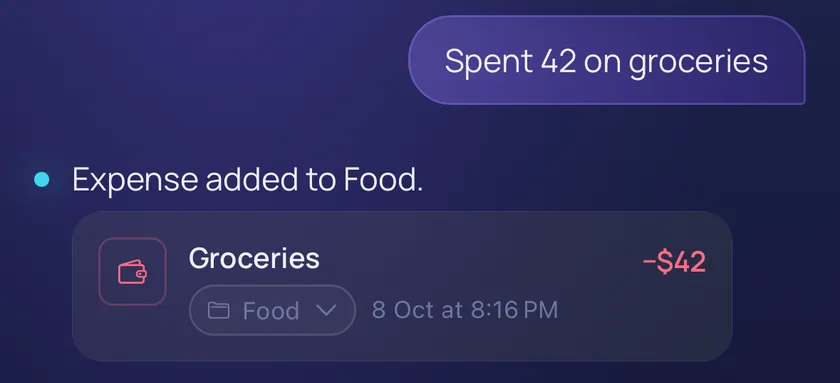
"Spent 42 on groceries"
Step 2. Livy Records and Organizes the Expense
Livy identifies the message as an expense and saves it. It replies "Expense added to Food." with the title, the amount and the project, as in the screenshot at the top of this page. Everyday food spending is grouped under Food, and other purchases can start or join a project when you mention it. It may not get every message right, which is why you can check and correct entries.
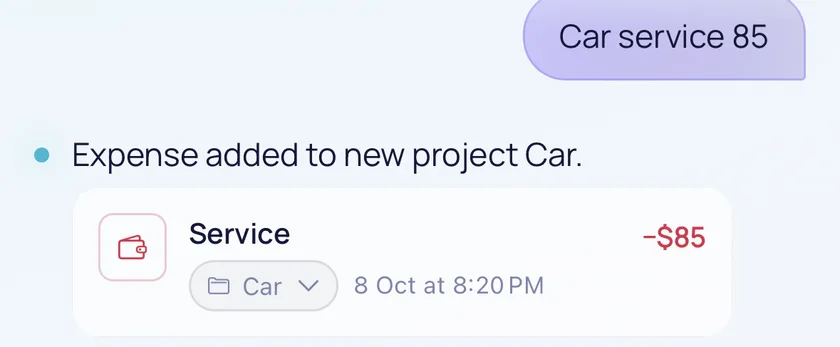
Amounts are shown with a $ sign. It only marks the number as money. Livy does not store a currency or convert between currencies, so just write the number you spent.
Step 3. Continue Recording Expenses Throughout the Day
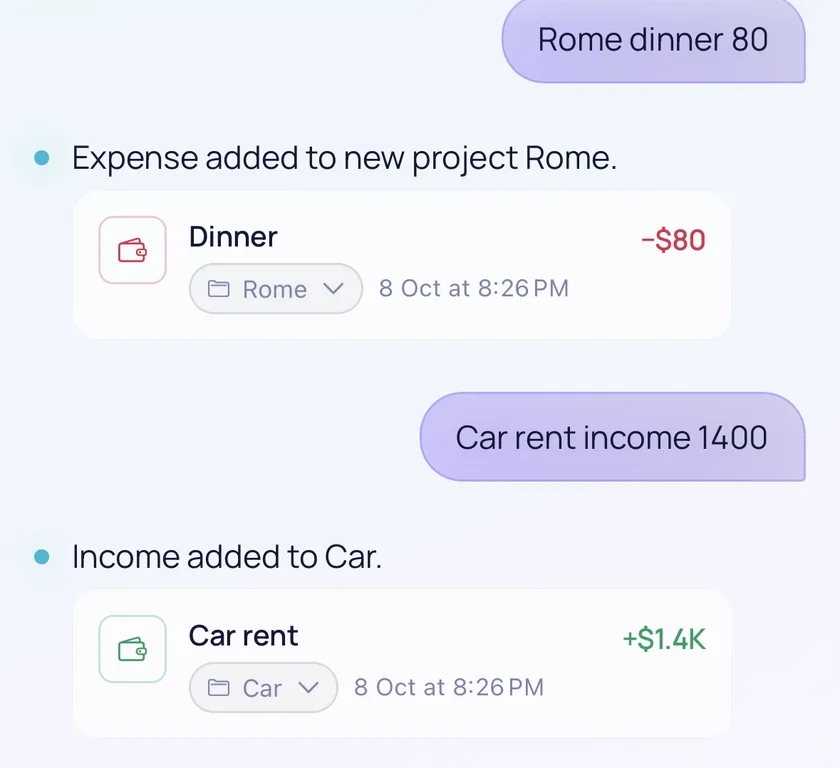
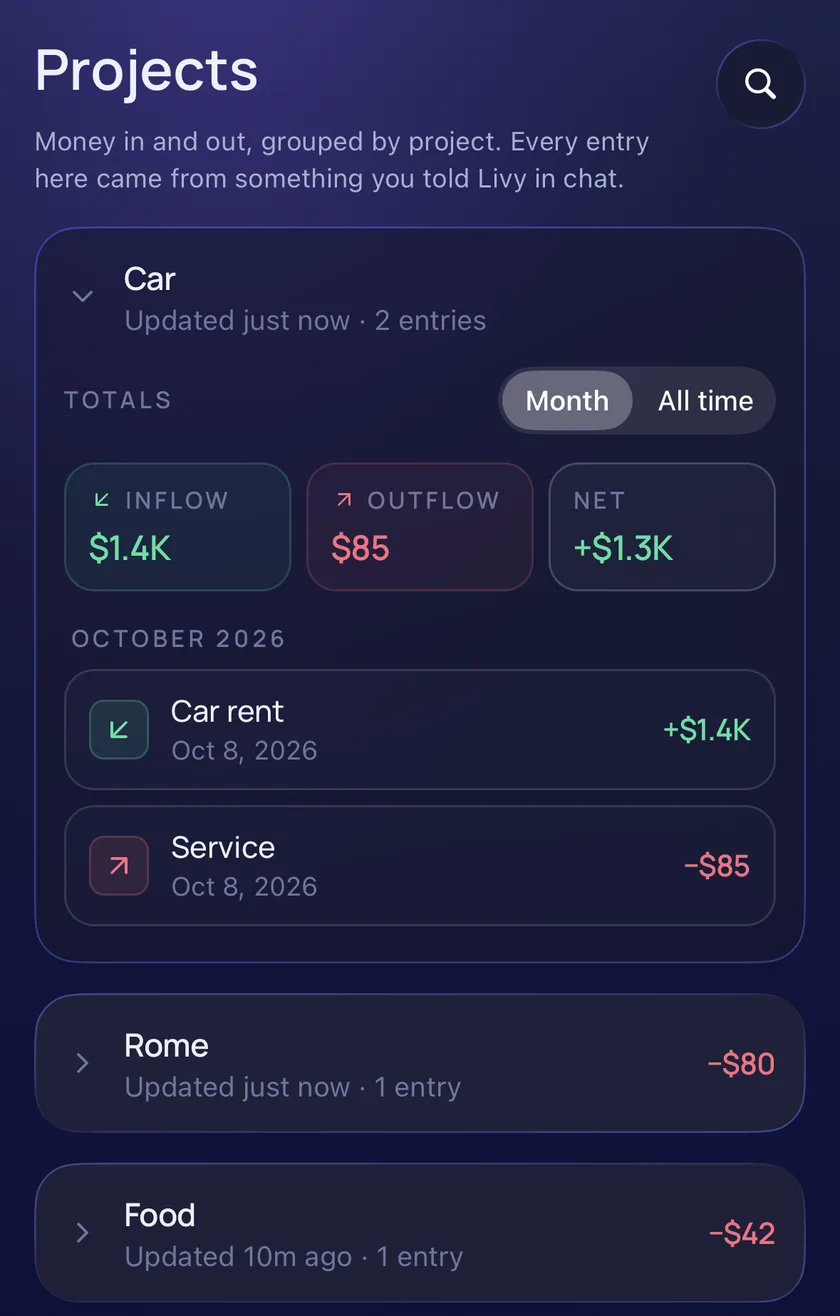
Each expense is its own short message, sent separately as the day goes on. A message such as "Rome dinner 80" starts a Rome project, and money coming in works the same way: "Car rent income 1400" is added to Car as income. The project on each card can be changed from the card itself.
Step 4. Review Your Spending Whenever You Need
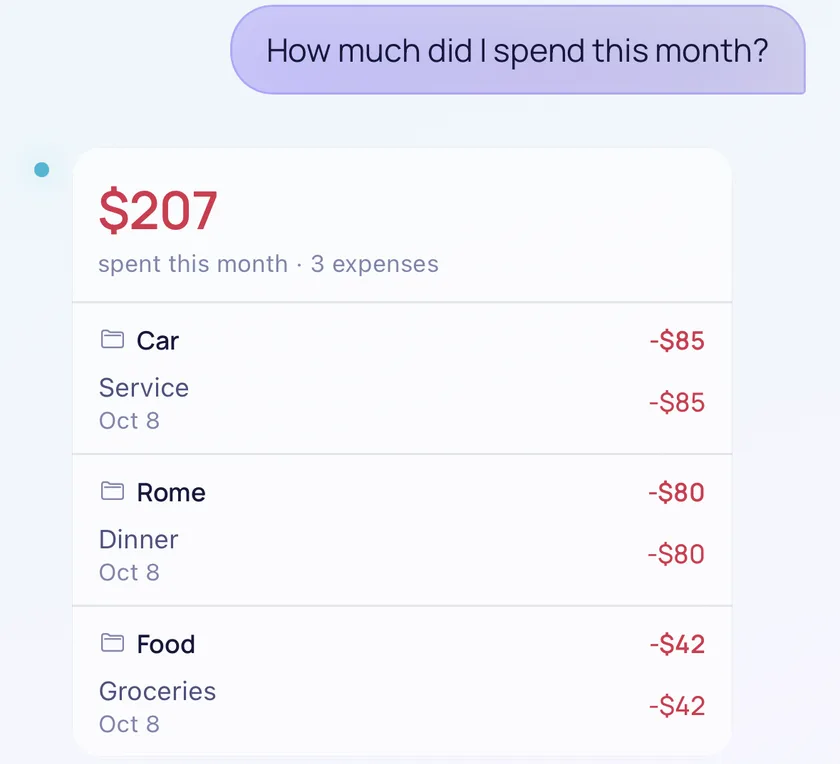
You can ask Livy about what you have recorded, in the same chat. Ask "How much did I spend this month?" and Livy answers with the total and lists the expenses by project: here $207 across 3 expenses.
The dashboard shows the same records in more detail. The Projects page groups money by project, with inflow, outflow and net totals for the month or for all time.
Step 5. Correct Entries When Necessary
If something landed in the wrong place, you can fix it. Right after Livy files an expense, you can move it to another project from the chat card. For older entries, use the dashboard to edit an entry or move it. Chat does not edit older transactions.
Everyday Expenses You Can Track With Livy
Each row below is a separate message. The project is chosen from the words you use.
| Message | Organized as |
|---|---|
| Spent 42 on groceries | Expense under Food |
| Coffee with Sarah 8 | Expense under Food |
| Car fuel 45 | Expense in the Car project |
| Home paint 120 | Expense under Housing, where home spending goes |
| Rome shopping 45 | Expense in the Rome project |
| Car repair 200 | Expense in the Car project |
Send one expense per message, which gives the most reliable result.
How to Understand Where Your Money Goes
Collecting records is not the same as understanding them. The useful part comes when you step back and ask how much you spent this month, how much went on your car, or how much a trip cost.
In Livy, you can ask in chat, for example "How much did I spend this month?" or "How much did I spend on my Car this month?". To compare projects, use the dashboard, where each project shows its own totals. Livy does not forecast spending or give budgeting advice. It shows you what you recorded.
Projects keep related spending together:
- Car: fuel, repairs and maintenance.
- Housing: household or renovation purchases.
- Rome: everything for a trip, if you name the trip.
- Food: everyday groceries and meals.
How to Make Expense Tracking a Daily Habit
Make Recording an Expense Quick
The less friction there is, the more likely you are to record the expense in the moment. Ten seconds beats two minutes.
Don't Aim for Perfect Categorization
Capture the expense first and tidy up later. A slightly wrong category beats a missing record.
Review Your Spending Once a Week
A short weekly look is usually enough to notice patterns. If what you need is to remember a bill or a payment date rather than track an amount, a reminder is the better tool, and we cover that in how to stop forgetting things with simple reminders.
Start Small
Record your everyday purchases for seven days, then look at the week. If it felt manageable, keep going. If not, you have learned which part is in your way.
Frequently Asked Questions
Can I Track Expenses Without Excel or Google Sheets?
Yes. You can use a notes app, a dedicated expense app or a conversational tracker. Spreadsheets are still worth it if you want detailed calculations.
What's the Easiest Way to Track Daily Spending?
Usually the one that takes the least effort, because you will keep doing it. For many people that means writing a short message instead of filling out a form.
Can I Track Expenses by Simply Typing a Message?
In Livy, yes. Write something like "Spent 42 on groceries" and Livy saves it as an expense. Messages should be in English.
Can I Track Expenses for Different Projects?
Yes. Livy groups expenses into projects such as Car, Housing or a trip, based on your words, for example "Car fuel 45" or "Rome shopping 45".
Can I Ask Livy How Much I've Spent?
Yes. Ask about what you have already recorded, such as "How much did I spend this month?".
Can I Try Livy Without Creating an Account?
Yes. You can open Livy and chat as a guest. Guest use is a limited trial, so you will be asked to sign up after a number of messages, and signing in unlocks the dashboard.
Start Tracking Expenses the Simple Way
Expense tracking does not have to mean maintaining spreadsheets, designing categories or spending a lot of time on data entry. What matters is making the capture simple enough to become a habit.
Whether it's coffee, groceries or a bigger purchase for your home, recording expenses should be simple. With Livy AI, you can write what you spent and let the app organize the details.
Related articles
Personal Finance
How to Track Income and Expenses for Side Projects
Why money from side projects, rentals and content platforms gets confusing, how a simple ledger per project helps, and how content creators can keep track of income from multiple sources.
· 9 min read
Notes & Personal Organization
How to Organize Notes Without Complicated Folders
Why notes get messy, when folders help and when they get in the way, a simple capture-first approach, and how to keep growing lists such as watchlists and reading lists in one place.
· 8 min read
Task Management
How to Turn a Messy To-Do List Into an Actionable Checklist
Why to-do lists become overwhelming, the difference between a vague task and an actionable checklist, a step-by-step method for breaking work into clear actions, and how to create them from a single message.
· 8 min read